 Tap2Cal
ICS file generator – create an .ics calendar file online.
Enter your event, get a link. Anyone who opens it can download the .ics file or add the event straight to their calendar – no account, no software.
What is an ICS file?
An ICS file (.ics, also called iCalendar or vCalendar file) is the universal format for calendar events. It contains the event name, start and end, time zone and optionally a location. Apple Calendar, Google Calendar, Microsoft Outlook, Samsung Calendar and practically every other calendar app can import it.
The problem: sending a raw .ics file is clumsy. Many messengers and social apps don't allow attachments, and on phones a downloaded file often ends up in the downloads folder instead of the calendar.
What your recipients see
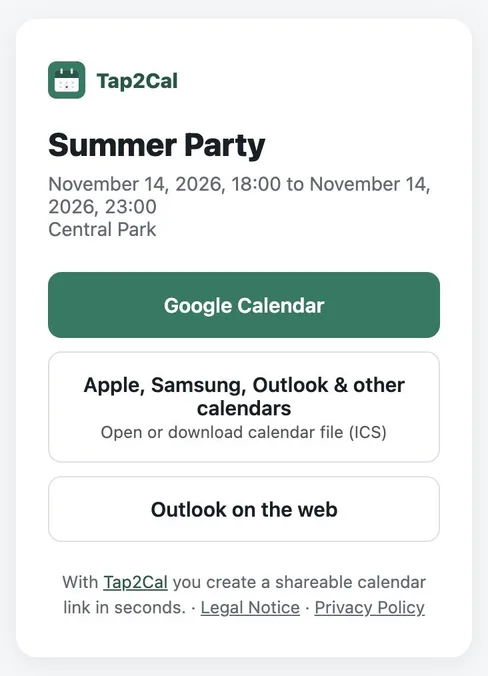
Whoever opens the link sees the event with name, date and location and picks their calendar with one tap – Google Calendar, Apple, Samsung and Outlook via ICS file, or Outlook on the web.
Why a link is better than an attachment
Tap2Cal turns your event into a short link. Behind the link sits a small event page that detects the device: on iPhone the ICS file opens directly in Apple Calendar, on Android and desktop recipients can choose Google Calendar, Outlook on the web or download the .ics file.
You can paste the link anywhere – email, WhatsApp, Instagram Story, newsletter, website or QR code. No attachment limits, no broken downloads.
How to create an ICS file in 3 steps
Enter the event
Event name, date, optional time and location. All-day events are supported.
Create the link
Click “Create event”. Tap2Cal generates the ICS file and a short link in the background.
Share or download
Send the link to your guests – or open it yourself to download the .ics file.
FAQ
Is the ICS file generator free?
Yes. Tap2Cal is completely free, without registration and without ads.
Which time zone does the ICS file use?
The time zone of your browser is stored with the event. Recipients in other time zones see the event at the correct local time.
Can I create an all-day event as ICS?
Yes. Enable “All day” and the ICS file contains an all-day entry without times – ideal for birthdays, holidays or Save the Dates.
Does the ICS file work with Outlook?
Yes. The .ics format is the native import format of Outlook (desktop and web), Apple Calendar and Google Calendar.
How long can the file be downloaded?
The link and the ICS file are available until 14 days after the end of the event, then they are deleted automatically.