 Tap2Cal
Calendar link for your Instagram Story – save the date in one tap.
Create a link, add it to your Story with the link sticker – whoever taps it has your event in their calendar. Works the same for WhatsApp Status, Facebook Story and Snapchat.
Why “save the date” posts get forgotten
Club parties, concerts, markets, fire brigade festivals: organisers announce the date weeks in advance in their Story. Everyone sees it – and almost no one writes it down. 24 hours later the Story is gone, and with it the date.
A calendar link fixes that. Instead of “screenshot this”, followers tap once and the event is saved in Apple Calendar, Google Calendar or Outlook – including time and location.
What your recipients see
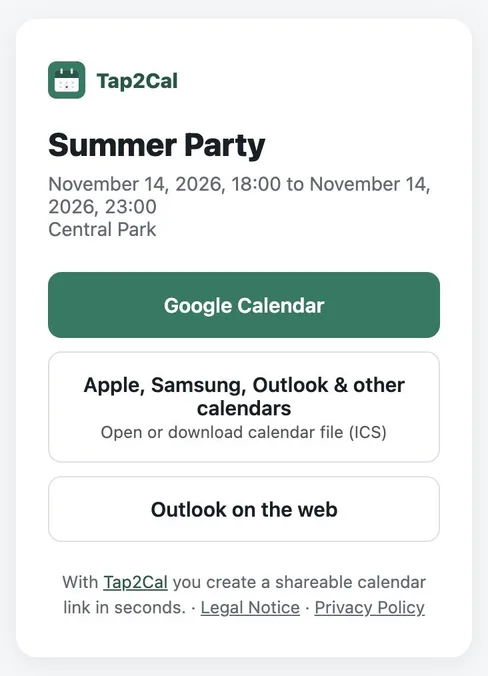
Whoever opens the link sees the event with name, date and location and picks their calendar with one tap – Google Calendar, Apple, Samsung and Outlook via ICS file, or Outlook on the web.
How to add the link to an Instagram Story
Create your event above and copy the link. In Instagram, open your Story, tap the sticker icon and choose the Link sticker. Paste the Tap2Cal link and give the sticker a call-to-action like “Save the date”.
Tap2Cal is built for Instagram's in-app browser: on iPhone recipients get a short hint how to open the event in Safari so the calendar import works reliably.
Also works for WhatsApp, Facebook & Snapchat
Paste the same link into your WhatsApp Status, a WhatsApp group, a Facebook Story or a Snapchat link sticker. One link, every channel – and every recipient can choose their own calendar app.
Calendar link in your Story in 3 steps
Create the event
Enter name, date and optionally time and location, then click “Create event”.
Add the link sticker
In your Instagram Story choose the Link sticker and paste the Tap2Cal link.
Followers save the date
Whoever taps the sticker adds the event to their calendar with one tap.
FAQ
Can everyone add a link sticker to an Instagram Story?
Yes, Instagram offers the Link sticker to all accounts. Paste your Tap2Cal link there.
Does it work in the Instagram in-app browser?
Yes. On Android the calendar opens directly. On iPhone Tap2Cal shows a hint to open the page in Safari, because Instagram's browser blocks calendar files.
Do my followers need an app or account?
No. Recipients only need their normal calendar app – no Tap2Cal account, no app download.
Can I use the same link in WhatsApp Status?
Yes. The link works everywhere – WhatsApp Status, groups, Facebook Story, Snapchat, email or your website.