 Tap2Cal
Google Calendar link generator – one link for every calendar.
Create an add-to-calendar link that opens Google Calendar with your event pre-filled – and also works for iPhone and Outlook users. No Google account needed to create it.
The problem with plain Google Calendar links
Google Calendar supports “template” links that open a pre-filled event. Building them by hand means encoding dates, times and time zones into a long URL – and the result only works for people who use Google Calendar.
In practice your audience is mixed: iPhone users rely on Apple Calendar, many companies use Outlook. A pure Google link leaves them out.
What your recipients see
Whoever opens the link sees the event with name, date and location and picks their calendar with one tap – Google Calendar, Apple, Samsung and Outlook via ICS file, or Outlook on the web.
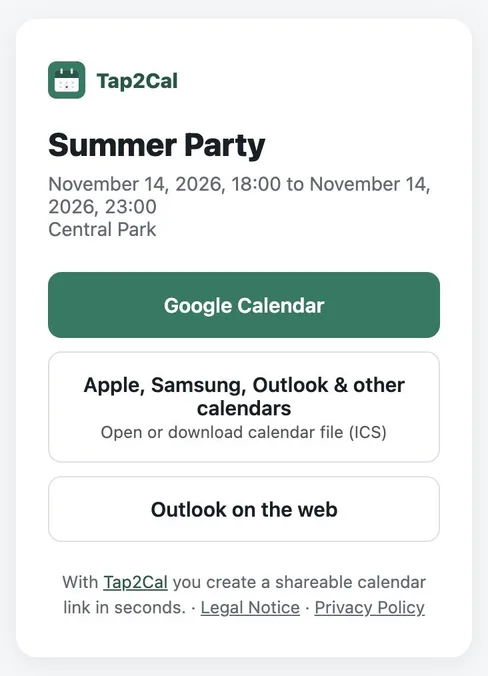
One link that works for Google, Apple and Outlook
Tap2Cal creates a short link to an event page. Android users tap Google Calendar and land in the pre-filled Google event. iPhone users get the event straight into Apple Calendar. Desktop users can choose Google Calendar, Outlook on the web or download the .ics file.
You don't need a Google account to create the link, and recipients don't need anything except their usual calendar.
How to create a Google Calendar link
Enter event details
Name, date, optional start and end time and location.
Create the link
Click “Create event” – you get a short, shareable link.
Share it
Recipients tap the link and choose Google Calendar, Apple Calendar or Outlook.
FAQ
Do I need a Google account to create the link?
No. You create the link without any account. Only recipients who choose Google Calendar use their own Google account to save the event.
Does the link work on iPhone?
Yes. On iPhone the event opens in Apple Calendar via an ICS file, so you don't need two different links.
Can I embed the link on my website or in a newsletter?
Yes. Use it as a regular “Add to calendar” button or text link anywhere.
Is the time zone handled correctly?
Yes. The event is saved with your time zone and shown in each recipient's local time.