 Tap2Cal
Share a calendar event on WhatsApp – saved with one tap.
WhatsApp has no real way to send calendar invites. Create a link here, send it in a chat, group or your Status – whoever taps it adds the event to their own calendar.
Why sharing events on WhatsApp is so awkward
On iPhone you can share an event from Apple Calendar, but WhatsApp turns it into a plain text or an .ics attachment that many Android phones can't open. On Android, Google Calendar has no share button for single events at all.
The result: people type the date into the chat, everyone says “👍” – and half the group forgets it.
What your recipients see
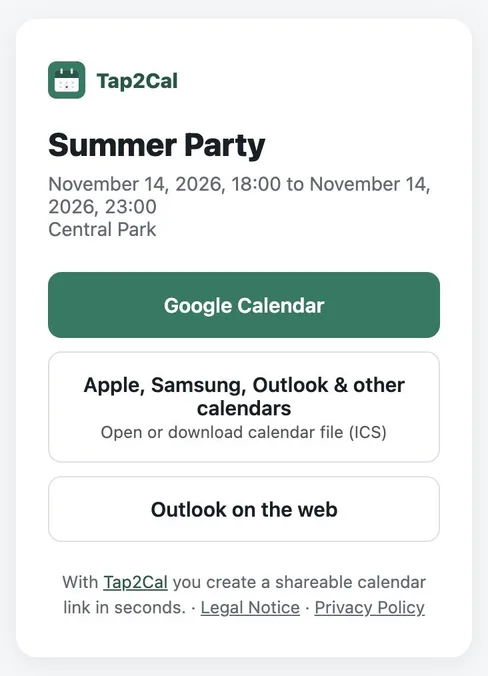
Whoever opens the link sees the event with name, date and location and picks their calendar with one tap – Google Calendar, Apple, Samsung and Outlook via ICS file, or Outlook on the web.
A link that works on every phone
Tap2Cal turns the event into a short link with a link preview. Android users tap Google Calendar, iPhone users get the event directly in Apple Calendar, everyone else can download the .ics file. Name, time, location and time zone are always correct.
It works for single chats, WhatsApp groups and communities, and for your WhatsApp Status – perfect for birthdays, team events, club meetings or parties.
How to send a calendar event via WhatsApp
Create the event
Enter name, date, optional time and location above and click “Create event”.
Send the link
Tap “Share” and choose WhatsApp – or paste the copied link into any chat, group or Status.
Guests save it
Each recipient taps the link and saves the event in their own calendar app.
FAQ
Does it work in WhatsApp groups?
Yes. Post the link once in the group – every member can save the event in their own calendar.
Can I share an event in my WhatsApp Status?
Yes. Paste the link into a text Status or add it to an image Status. Viewers tap the link to save the event.
Does it work on Android and iPhone?
Yes. Android users can choose Google Calendar, iPhone users get the event in Apple Calendar, and everyone can download the .ics file.
Do recipients need an app?
No. They only need their normal calendar app – no Tap2Cal account, no download.